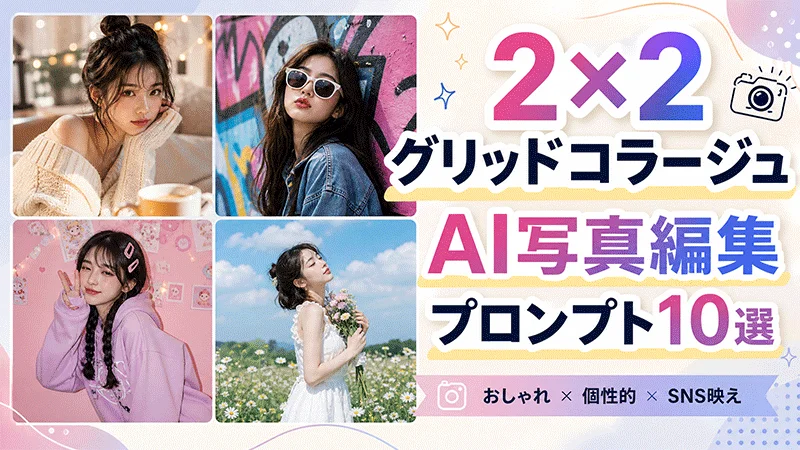
2×2グリッドコラージュは、異なる表情やポーズ、衣装、瞬間を1枚のクリエイティブなフレームに収める、2026年に注目を集めている人気の表現方法です。AI写真編集プロンプトを活用すれば、高度な編集スキルがなくても、アップロードした1枚の画像をおしゃれな4分割コラージュに簡単に変換できます。
本記事では、SNS映えするプロフェッショナルなビジュアルを数秒で作成できる、厳選した2×2グリッドコラージュAI写真編集プロンプトをご紹介します。シネマティックな演出、ファッションを意識したレイアウト、トラベルテーマ、ロマンチックなデザイン、SNS向けのエステティック表現など、あらゆるニーズに応えるプロンプトを厳選しました。ぜひ最後までお読みください。

パート 1. 2×2グリッドコラージュAI写真を作成する理由
2×2グリッドコラージュは、2026年のInstagramを中心に大きなトレンドとなっています。1枚の画像に複数の表情、衣装、ポーズ、シーンを収めることで、視覚的に魅力的なコンテンツを演出できます。以下に、2×2グリッドコラージュを作成すべき主な理由をご紹介します。
- 多彩なスタイルを1枚に凝縮: 2×2コラージュを活用すれば、1枚の写真の中で4つの異なるルック、雰囲気、ポーズ、背景を同時に表現できます。
- 視覚的に印象的なコンテンツを実現: グリッドレイアウトにより、写真がより整理され、クリエイティブで、SNSの視聴者にとって魅力的な仕上がりになります。
- バイラルトレンドに乗る: このタイプのコラージュは、Instagram、Facebook、TikTok、PinterestなどのSNSプラットフォームで人気を博しています。
- 誰でも簡単に作成可能: 2×2グリッドコラージュは、プロの編集経験がない方でも、非常に簡単かつ手軽に作成できます。
パート 2. 2×2グリッドコラージュAI写真編集プロンプト厳選10選
効果的な2×2グリッドプロンプトは、被写体、ポーズ、衣装、背景、照明、および4パネル全体のビジュアルスタイルを明確に記述する必要があります。以下では、SNS投稿に最適な2×2グリッドコラージュを生成するためのGemini向けプロンプトアイデアを厳選してご紹介します。
1 サニー・ジョイフルコラージュ
“Use the uploaded image and transform it into a stylish 2X2 grid collage with four bright and cheerful panels. Preserve the subject’s facial features and identity. Show different happy expressions in each frame, including a soft smile, open laughter, playful grin, and candid joyful look. Add sunny outdoor backgrounds, warm golden lighting, pastel tones, and casual, fashionable outfits. Make the collage look clean, vibrant, Instagram-worthy, and balanced, with each panel offering a fresh and lively summer vibe.”
2 ドリーミー・エステティックコラージュ
“Turn the uploaded image and turn it into a 2X2 collage with a dreamy aesthetic look. Preserve the subject’s identity while showing soft and gentle expressions such as a peaceful smile, closed-eye relaxed pose, thoughtful look, and calm, dreamy gaze. Add pastel backgrounds, soft clouds, floral elements, diffused lighting, and elegant outfits. Each panel should feel delicate, artistic, and romantic, with a soothing color palette. Make the collage visually cohesive, polished, and ideal for Instagram, Pinterest, or a creative profile photo.”
3 レイニー・ムードコラージュ
“Transform the uploaded image and generate a 2X2 grid collage with a moody rainy-day theme. Keep the subject’s face natural and consistent across all four frames. Show emotional and reflective expressions, including a thoughtful gaze, soft, melancholic smile, distant look, and calm, introspective pose. Add rain-soaked windows, umbrella scenes, wet streets, and cinematic blue-gray lighting. Include layered outfits like coats or sweaters for extra mood. Make the collage feel emotional, atmospheric, and visually rich, with each panel telling a different rainy-day story.”
4 プレイフル・ポップコラージュ
“Use the uploaded image and create a colorful 2X2 grid collage with a fun pop-art inspired vibe. Maintain the subject’s facial details and identity. Show playful expressions in each panel, including a wink, cheeky smile, surprised face, and tongue-out fun pose. Add bright color backgrounds, funky props, energetic lighting, and trendy casual outfits. Each frame should feel youthful, expressive, and lively while still fitting together as one collage. The final image should look viral, eye-catching, creative, and perfect for Gen Z social media content.”
5 シネマティック・ゴールデンアワーコラージュ
“Turn the uploaded image to create a cinematic 2X2 grid collage in a horizontal 16:9 aspect ratio. Preserve the subject’s exact facial identity, skin tone, hairstyle, and body proportions. Show four unique expressions: a hopeful upward gaze, a peaceful closed-eye pose, a gentle side smile, and an amazed sunset reaction. Place the subject in golden fields, beside a lake, on a hilltop, and near a countryside road. Add warm sunlight, lens flare, realistic shadows, detailed clothing, and professional movie-style color grading.”
6 ラグジュアリーホテルライフスタイルコラージュ
“Transform the uploaded image into an elegant 2X2 grid collage formatted in a wide 16:9 aspect ratio. Keep the person’s face recognizable and consistent across every panel. Feature four different expressions: a sophisticated neutral look, a welcoming smile, a curious glance toward the window, and a proud, confident pose. Show the subject in a luxury hotel lobby, stylish bedroom, rooftop restaurant, and marble hallway. Add premium outfits, soft interior lighting, reflective surfaces, realistic textures, balanced framing, and a polished lifestyle-magazine appearance.”
7 ウィンター・スノーアドベンチャーコラージュ
“Use the uploaded photo as a reference and generate a winter-themed 2X2 grid collage in 16:9 widescreen format. Maintain the original facial structure and natural appearance. Give every panel a distinct expression: delighted surprise while seeing snow, a cozy contented smile, a determined mountain-climber look, and a playful expression while catching snowflakes. Include snowy forests, a wooden cabin, frozen mountains, and a winter town. Add fashionable coats, scarves, natural snowfall, cool lighting, realistic breath mist, and highly detailed cinematic scenery.”
8 コージー・コーヒーショップコラージュ
“Turn the uploaded image to produce a warm 2X2 grid collage in a wide 16:9 aspect ratio. Keep the face, hairstyle, and natural features consistent in all four panels. Show different expressions: focused while reading a book, pleasantly surprised by a drink, quietly amused while looking outside, and relaxed with a warm, satisfied smile. Set the scenes inside a rustic café, beside a rainy window, near a bookshelf, and at an outdoor coffee table. Add cozy sweaters, warm lighting, coffee steam, realistic details, and soft cinematic depth.”
9 フィットネス・モチベーションコラージュ
“Convert the uploaded photo into an energetic fitness-themed 2X2 grid collage in 16:9 landscape format. Preserve the subject’s facial identity and realistic body proportions. Create four different expressions: intense concentration during exercise, exhausted determination after training, proud satisfaction after completing a workout, and an energetic motivational shout. Show the subject lifting weights, running on a treadmill, stretching near a window, and standing confidently in a modern gym. Add athletic clothing, dramatic lighting, subtle sweat, dynamic movement, sharp details, and inspirational commercial-style photography.”
10 ビーチ・バケーションコラージュ
“Transform the uploaded image into a vibrant beach-themed 2X2 grid collage in a 16:9 widescreen ratio. Preserve the subject’s facial features and create four noticeably different expressions: astonishment at the ocean view, carefree laughter while walking, a peaceful expression during sunrise, and an adventurous look while exploring rocks. Use tropical beaches, a seaside café, a wooden pier, and a cliffside viewpoint. Add stylish vacation outfits, ocean reflections, palm trees, natural sunlight, gentle wind movement, colorful scenery, and high-quality travel photography with balanced composition.”
パート 3. シンプルなプロンプトで2×2グリッドコラージュを作成できる最適なAIツール
シンプルなChatGPT向け2×2グリッドコラージュプロンプトで高品質なコラージュを作成したい場合、 HitPaw Edimakor のご利用をおすすめします。HitPaw Edimakorは、テキストプロンプトや参照画像を使用して高品質なビジュアルを生成できる、現在最も優れたAIツールの1つです。自分の写真をアップロードし、詳細な2×2コラージュプロンプトを入力するだけで、AIが異なるポーズ、表情、衣装、背景、照明スタイルを組み合わせた4パネルのクリエイティブなコラージュに自動変換します。直感的な操作画面で、プロの編集経験がない初心者の方でも安心してご利用いただけます。さらに、HitPaw Edimakorはコラージュ作成にとどまらず、幅広いAI機能を搭載しています。Face Swap(顔交換)、Text-to-Speech(テキスト読み上げ)、Watermark Remover(透かし除去)など、人気のAIツールを多数ご用意しています。


HitPaw Edimakorの主な機能
- 画像からの参照生成: HitPaw Edimakorの大きな特徴の1つは、2×2グリッドコラージュ、アニメ、カートゥーン、サイバーパンクなど、さまざまなスタイルへと既存の画像を自由に変換できる点です。
- 複数のAIモデル対応: 本プログラムは幅広いAIモデルに対応しており、ユーザーは複数のスタイルを試すことができます。Nano Banana 2、Chat GPT、Gemini、Seedream 5.0 Proなど、人気のAIモデルをご利用いただけます。
- 豊富なAIツール群: HitPaw Edimakorは、AI フェイススワップ(顔交換)、透かし除去、テキストから画像生成、テキスト読み上げ、AI動画高画質化、動画から動画生成、オンライン画像編集など、多彩な人気AIツールを提供しています。
- テキストから画像生成: テキストから画像生成機能を使用すれば、文章の説明だけで高品質なビジュアルを作成できます。詳細な2×2グリッドコラージュプロンプトを入力し、希望のAIモデルを選択するだけで、画像が自動生成されます。
- 初心者にも優しいインターフェース: クリーンで直感的なインターフェースを採用しており、プロの編集経験がない初心者の方でも安心してご利用いただけます。ほとんどのAI機能は、わずかなステップで簡単に実行できます。
HitPaw Edimakorで2×2グリッドコラージュを作成する方法
HitPaw Edimakorを使えば、高度な編集スキルがなくても、誰でも簡単かつ迅速に2×2グリッドコラージュを作成できます。以下に、具体的な手順をご案内します。
ステップ 1: HitPaw Edimakorの公式サイトから最新版をPCにダウンロードし、起動します。左側のパネルから「ツールボックス」を選択し、次に「参照画像」オプションをクリックしてください。
ステップ 2: 「アップロード」ボタンをクリックし、2×2グリッドコラージュに変換したい画像を選択してください。
ステップ 3: 続いて、ポーズ、表情、衣装、背景などを詳細に記述した2×2グリッドコラージュAI写真編集プロンプトを入力してください。
ステップ 4: 出力枚数を選択し、「生成」ボタンをクリックして作成を開始します。AIがアップロードした写真とプロンプトを解析し、魅力的なコラージュ画像に自動変換されます。
まとめ
本記事では、ありきたりな写真をSNS映えするビジュアルに変換できる、厳選した2×2グリッドコラージュAI写真編集プロンプト10選をご紹介しました。また、高品質なコラージュ作成に最適なAIツール「HitPaw Edimakor」についても解説しました。シンプルなテキストプロンプトを入力するだけで、誰でも簡単にプロ級のコラージュ画像を生成できます。
コメントで参加しよう!
HitPawの記事にレビューを書いてみましょう!